
Type a few words about your business and get a store back. Every ecommerce platform now offers some version of that, and so do a growing number of AI coding tools. The demos are impressive, and the first ten minutes really are faster than they used to be.
The useful question isn't which AI store builder makes the prettiest first draft. It's what's left for you once the draft exists: payments, shipping, tax, real product photos, the apps you'll add, and every change after launch. This guide sorts AI store builders into three kinds by exactly that, and gives you a half-hour test to run on any of them before you commit.
A disclosure: we make ZingaShop, which competes with some of the tools below. We've kept to what each vendor says publicly and to things you can check yourself.
Three kinds of AI store builder
They look alike in a demo. They're very different to live with.
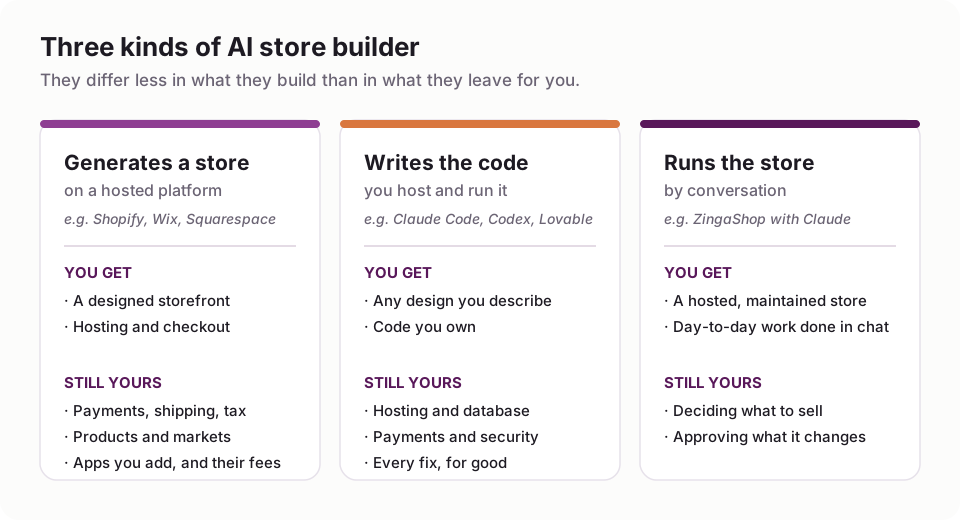
The difference that matters is the bottom half of each card.
1. Platforms that generate your store
This is what most people mean by an AI store builder: a hosted ecommerce platform that drafts the store for you. The best-known is Shopify's.
Shopify's AI store builder and Canvas
Shopify launched its AI store builder in May 2025. You describe your business in a few words, it generates store designs to choose from, and you carry on in the usual theme editor. Shopify says generating the designs is free; you need a paid plan to start selling once the trial ends.
On 1 October 2026 it added Canvas, a design surface where you build the store by chatting with Sidekick, Shopify's AI assistant. Sidekick now works directly on the theme's files, shows you the real store rendered as it changes, and checks its own work by taking screenshots. At launch, by Shopify's own account to TechCrunch, Canvas works on desktop only and doesn't yet cover third-party themes, app blocks and extensions, markets, translations or theme updates; Shopify says those will come over time, and that Canvas isn't replacing the existing editor yet.
It's a real step forward for design. Notice what it's about, though: the look of the store. The decisions that make a store work in your country are mostly elsewhere.
Wix, Squarespace and the website builders
The big website builders all generate a site from a description now, and most can add a shop to it. They're quick to a good-looking first draft and well suited to a small catalog. Check how far the store side goes before you rely on it: variants with their own prices and stock, tax that's right for your country, and the payment methods your customers use.

The AI builds the shop front. The boxes in the back are still yours to unpack.
What stays yours
- Payments. Each platform has its own gateway and its own rules for using anyone else's, sometimes with an extra fee on every sale. If your customers pay by UPI, iDEAL or Afterpay, check that first.
- Shipping and tax. Zones, rates, prices including VAT or GST, and sales tax by US state are set up by hand, on every platform.
- Your products. The AI writes placeholder products and stock photos. Your real catalog, with real photos and honest descriptions, is still your job, and it's most of what sells.
- Apps. Reviews, loyalty, WhatsApp, bundles: on most platforms each is an app with its own monthly bill.
2. AI that writes the code
The second kind skips the platform altogether. Coding agents such as Claude Code and OpenAI's Codex, and app builders such as Lovable, write a complete store from your description: any design you can explain, with code you own.
The catch is the other half of that sentence. You own the code, so you own hosting, the database, payment webhooks, security updates, backups and every 2 a.m. fix. We've written step-by-step guides for building a store with Claude, ChatGPT and Grok, including what it costs to run afterwards: about $66 a month in bills for a lean 300-orders-a-month store, $200 run properly, plus your time.
This kind is right when what you sell doesn't fit any platform, or when you have a developer's time every month. For a typical catalog, it trades a platform's monthly fee for a part-time job.
3. A store you run by talking to an assistant
The third kind turns the idea around. Instead of AI generating a store once, a hosted platform runs the store, and an AI assistant does the work in it, every day, in plain English.
This is how ZingaShop works with Claude. The store, checkout, hosting, database and caching are ours to run and look after. Through the ZingaShop connector, Claude can then do the work you'd otherwise click through: create categories, add products with their variants and prices, update stock, set up coupons, bring products and customers across from Shopify or WooCommerce, and answer questions like "what sold best last week?". You choose whether it may only read or also make changes, and you can revoke its access at any time.
The first draft is less magical than a generated design. Our setup wizard gives you a live store with a starter catalog for your kind of business, on a free myzinga.shop address, in a couple of minutes, and you shape it from there. What you get in return is that day 200 is as easy as day one, because the assistant is still there doing the changes, and the parts that break are ours to fix.

With the connector on, the assistant works through the same permissions as the ZingaShop console.
Test any AI store builder in 30 minutes
Demos show the first draft. Before you commit, spend half an hour on the things that decide whether the store works:
- Add a real product with three sizes at different prices, each with its own stock. Check that the right price shows when a shopper picks each size, on a phone.
- Set your tax. Prices including VAT or GST if that's what your customers expect, or sales tax added at checkout. Look at the total on the checkout page.
- Set two shipping zones, one with free shipping over a threshold, and check both at checkout.
- Pay with the methods your customers use: UPI, PayPal, Afterpay, iDEAL, cash on delivery. Not just a test card on a laptop.
- Change a price, then check the product page, the category page and the cart all show the new one.
- Export your products, customers and orders. If you can't get them out as a file, you can't leave.
- Ask what happens to your URLs if you move. When we moved our own site to new software without redirects, our search impressions fell by more than 90% in a month.
What AI store builders cost
The AI part is usually free or included. The store isn't. Platforms charge a monthly plan, often plus a fee on each sale when you use your own payment gateway, plus paid apps. Code-generated stores cost hosting, a database and monitoring, plus the AI subscription and your time. Read every platform's pricing page for your own country, because plans and fees change often.
ZingaShop has a free plan for up to 50 products and 50 orders a month. Paid plans start at $19 a month in the US, with a flat fee per order that drops from $0.20 on Free to $0.05 on Scale, never a percentage of your sales, and prices for India set at about half the US level. You connect your own payment gateway with no extra fee. ZingaShop pricing has every plan.
Which kind should you choose?
- You want a beautiful store fast and are happy on one platform's ecosystem: a platform that generates your store. Run the 30-minute test on payments and tax first.
- What you sell doesn't fit any platform, and you have development time every month: AI that writes the code.
- You'd rather describe changes than make them, and never want to manage a server: a hosted store run by an assistant, such as ZingaShop with Claude.
For the wider comparison of platforms, with or without AI, see our honest guide to ecommerce website builders.
FAQ
Common questions
What is an AI store builder?
Is Shopify's AI store builder free?
What is Shopify Canvas?
Can AI build a whole ecommerce store?
Can I use ChatGPT or Claude as an AI store builder?
Will an AI-built store rank on Google?
Let AI run the store, not just draft it
Start free on ZingaShop, then connect Claude to manage your catalog in plain English.