
We build an ecommerce platform, so read this with the appropriate pinch of salt. We also sell on it: our own car-care store, kkeautocare.in, runs on ZingaShop. Between building the thing and selling on it, we've made most of the mistakes this guide warns about. A couple of them this month.
Every "best ecommerce website builder" list we read while writing this crowned a different winner, and most of them were right for somebody. The builder that suits a craft brand selling forty products in Portland is not the one that suits a car-care shop in Pune taking cash on delivery. So instead of a league table, this is how we'd choose, with the pick we'd make for each kind of store.
What we know first-hand, and what we don't: we know ZingaShop from the inside, because we write it and sell on it. For Shopify, Wix, Squarespace, WooCommerce and BigCommerce we've gone by their own documentation and pricing pages. Those change often, so check them before you sign up for anything.
The short version
If you only read one part of this, read this. If you want the biggest app store and have the budget to build on it, choose Shopify. If you sell a handful of products and the look of the site matters most, Wix or Squarespace. If you have WordPress skills, or a developer, and want to own every line of it, WooCommerce. For a large catalog or wholesale, BigCommerce. And if you'd rather have the store, your customer messages and WhatsApp in one place, without paying a percentage of every sale, that's what we built ZingaShop for.
The rest of the guide is the reasoning, so you can check it against your own business.
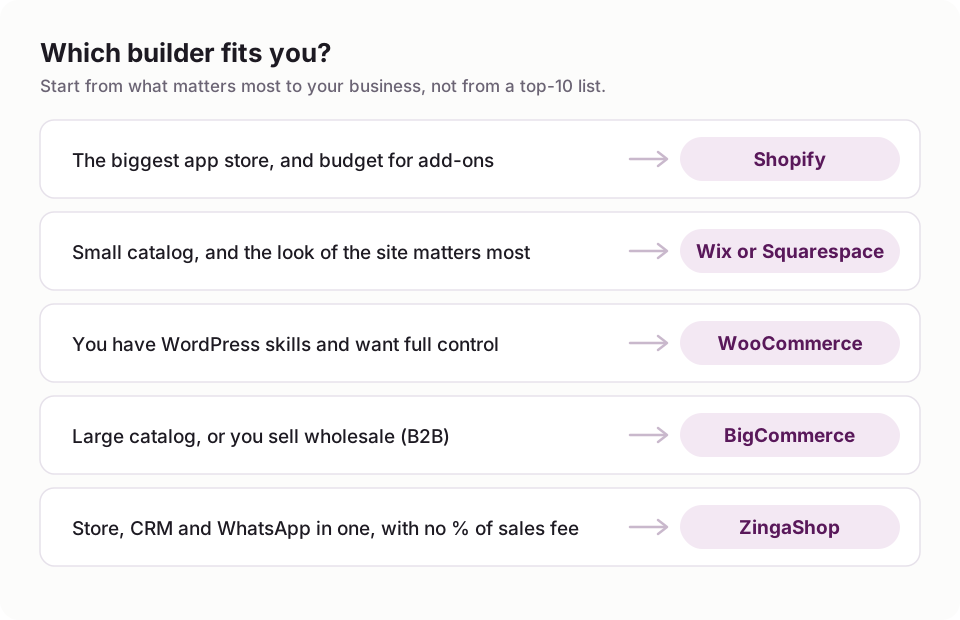
The short version, as a picture.
What actually separates one ecommerce website builder from another
Feature lists are long and nearly identical. Every builder has themes, a cart, discount codes and a blog. The differences that cost people money tend to show up three to six months in, and they fall into six places.
The bill, not the plan price
The plan price is the tip of it. Underneath sit the apps you'll add for reviews, subscriptions, email and WhatsApp; a premium theme if the free ones don't fit; and any fee the platform takes on each sale on top of what your card processor charges. It's common for a $29 plan to end up nearer $120 a month once the app invoices arrive. Before you compare plans, write down every tool you'd need in month six and price those too.

The plan price is the part you see.
Fees that grow with you
A 2% fee looks like nothing when you take ten orders a week. At 3,000 orders a month with a $30 average order, it's $1,800 a month, against $300 for a flat ten cents an order. The chart below runs the numbers at four sizes of store.
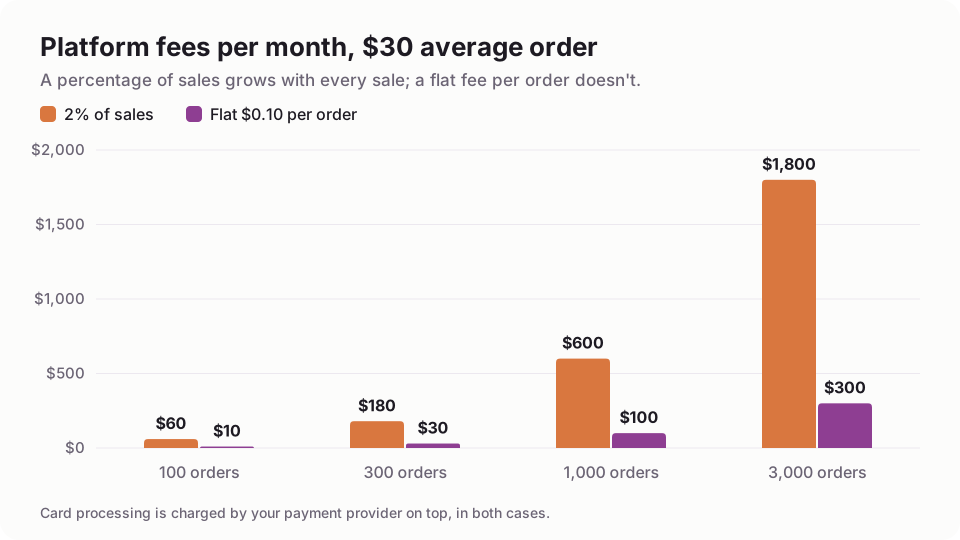
At 3,000 orders a month, a 2% platform fee costs six times a flat $0.10 per order.
This is the one place our bias is a decision rather than an accident. ZingaShop doesn't sit between you and your money: you connect your own payment gateway, so the customer's payment lands in your account. Taking a percentage of it would simply be a tax on your growth, so we charge a small flat fee per order instead. Whatever you choose, work the fee out at the volume you hope to reach, not the volume you have.
Whether it takes the way your customers pay
Check this before you design a single page. In India that means UPI and cash on delivery; across much of Asia and Africa, local wallets and bank transfers; almost everywhere, PayPal. Then test it on a phone, with a real payment app. Earlier this month we found that UPI payments made on phones needed a different confirmation path from desktop ones on our own platform. It's exactly the kind of problem that never shows up when you test checkout on a laptop.
Where else you can sell
Google shows products from Merchant Center in its free listings, Instagram and Facebook sell from a catalog, Amazon is its own world, and plenty of online shops end up with a counter or a market stall too. A builder that connects to those itself saves you a connector app and a weekly sync headache for each one.
Catalog depth and speed
Variants, bundles, digital downloads, wholesale price lists, a second storefront in another currency: easy to ignore at launch, expensive to bolt on later. And test speed on a real store built with the platform, on your phone over mobile data, not on the vendor's demo on your office Wi-Fi. Slow pages lose sales and rankings.
What you keep if you leave
We learned this one the hard way, and not with a store. In July we moved zingasuite.com itself onto new software and didn't carry the old article addresses across. Google kept sending people to pages that no longer existed, and by August our search impressions had dropped from around sixty a day to three. It took us seven weeks to notice.

Moving platforms is moving house: pack the data, and leave a forwarding address for every old URL.
So when you choose a builder, check two things: that you can export your products, customers and orders as CSV files, and that you can redirect old URLs to new ones. If you're moving from another platform, set the redirects up before you switch, not after.
The main ecommerce website builders, compared
Shopify
Shopify is the default for good reasons: a polished checkout, thousands of themes and the biggest app store in ecommerce. If you need something unusual, someone has probably built an app for it. The catch is that a lot of what you'll want lives in those apps, each with its own monthly charge, and Shopify adds its own fee when you use a payment gateway other than Shopify Payments. It suits brands that want the widest choice of add-ons and have the budget to assemble them.
Wix and Squarespace
Both started as website builders and added a shop later, and it shows in the best way: they're the quickest route to a site that looks good, which is why studios, creators and service businesses love them. Where they get harder is operations. Complex variants, several warehouses or a marketplace feed take more work as you grow.
WooCommerce
WooCommerce is free, open source and endlessly adaptable, and you own all of it. You also run all of it: hosting, security updates, backups, plugin conflicts and speed. The software costs nothing; the time, or the developer, does. It makes most sense if you already have a WordPress site with an audience.
BigCommerce
BigCommerce puts more into the box than most hosted platforms, with real strength in wholesale and large catalogs. It's a better fit for an established merchant moving up than for someone opening a first store.
ZingaShop
ZingaShop is the commerce app in ZingaSuite. The store, your customer records, WhatsApp and email, help docs and link tracking share one login and one customer list, so you're not paying for five tools and keeping them in sync. You connect your own gateway (Razorpay, PayU, PayPal, Stripe, cash on delivery and others), and pay a plan plus a flat fee per order, never a percentage of sales.
There's a free plan with up to 50 products on a free myzinga.shop address, and paid plans from $19 a month add your own domain. Higher plans add Google, Meta and Amazon channels, promotions and loyalty, gift cards, multi-currency storefronts and an in-store POS.
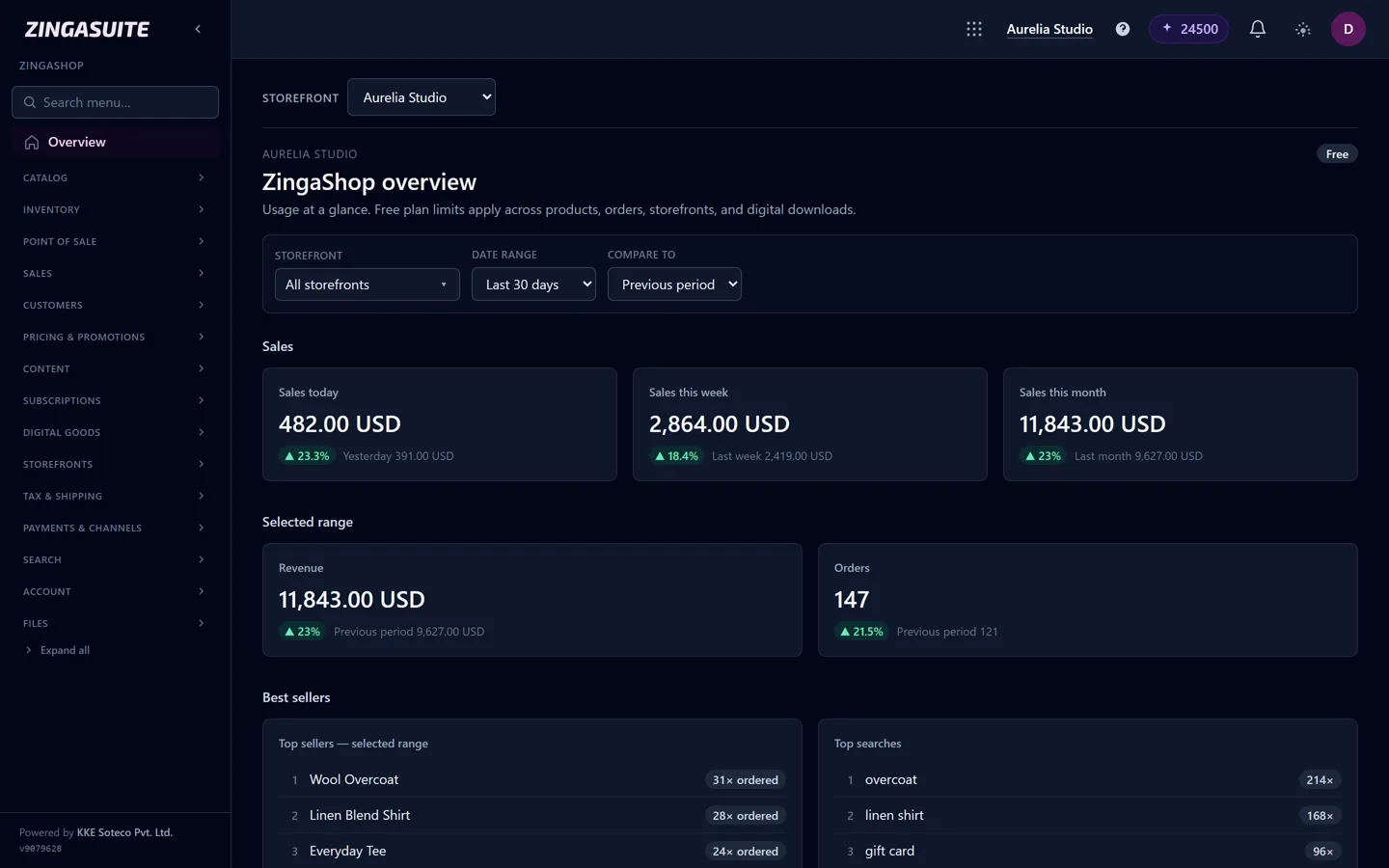
The ZingaShop overview from the console: sales, orders and best sellers across every storefront.
Where it's weaker: ZingaShop is younger than everything else on this list, so there are fewer third-party themes and apps. If your plans hinge on a particular marketplace app, check that it exists before you commit. It suits small and growing businesses, especially where customers talk to you on WhatsApp, that would rather run one system than a stack.
At a glance
How the main builders differ
| Shopify | Wix | WooCommerce | ZingaShop | |
|---|---|---|---|---|
| Free plan | Trial only | Site only; selling needs a paid plan | Free plugin; you pay for hosting | Yes, up to 50 products |
| Fee on top of card processing | With third-party gateways | No | No | Flat per order, never a % |
| Use your own payment gateway | Yes, with an extra fee | Limited list | Yes | Yes |
| You run hosting and updates | — | — | — | |
| CRM and WhatsApp messaging built in | Via apps | Basic | Via plugins | |
| App and theme ecosystem | Largest | Large | Very large | Growing |
From each platform's own pages, October 2026. Plans change often, so confirm current terms before you sign up.
If you're building an ecommerce website in India
A lot of the people searching for this are in India, and the checklist there is different enough to deserve its own section.
Start with payments. UPI is now the most-used way to pay online in India, so paying by UPI app has to be quick on a phone, alongside cards, net banking and wallets through a gateway such as Razorpay or PayU. Many shoppers still want cash on delivery, and every COD parcel that comes back unopened costs you twice, so confirm COD orders on WhatsApp before you dispatch them. It noticeably cuts returned-to-origin (RTO) parcels.

UPI on a phone, cash on delivery at the door, and a WhatsApp confirmation in between.
Then the details shoppers notice. Packaged goods must show the M.R.P., and customers expect to see it struck through next to your price with the discount. It also has to change when they pick a different size or pack, which is easy to get wrong: we fixed exactly that on ZingaShop product pages this month. Add GST-ready invoices with your GSTIN and HSN codes, delivery estimates by pin code, and WhatsApp for order updates, because that's where your customers already are.
ZingaShop handles all of these, from UPI and cash on delivery to M.R.P. per variant and WhatsApp payment reminders through ZingaConnect, and its plans are priced for India at about half the US price.
Elsewhere
In the UK and Europe, prices are shown with VAT included, cross-border sales have their own VAT rules, and the cookie banner has to meet GDPR. Australian prices include GST. Canada charges GST, HST or PST depending on the province you ship to, and US sales tax depends on where you have nexus and where you ship. Whatever you choose, confirm it handles your gateway and your tax display before you commit; it's the most common reason people rebuild a store in the first year.
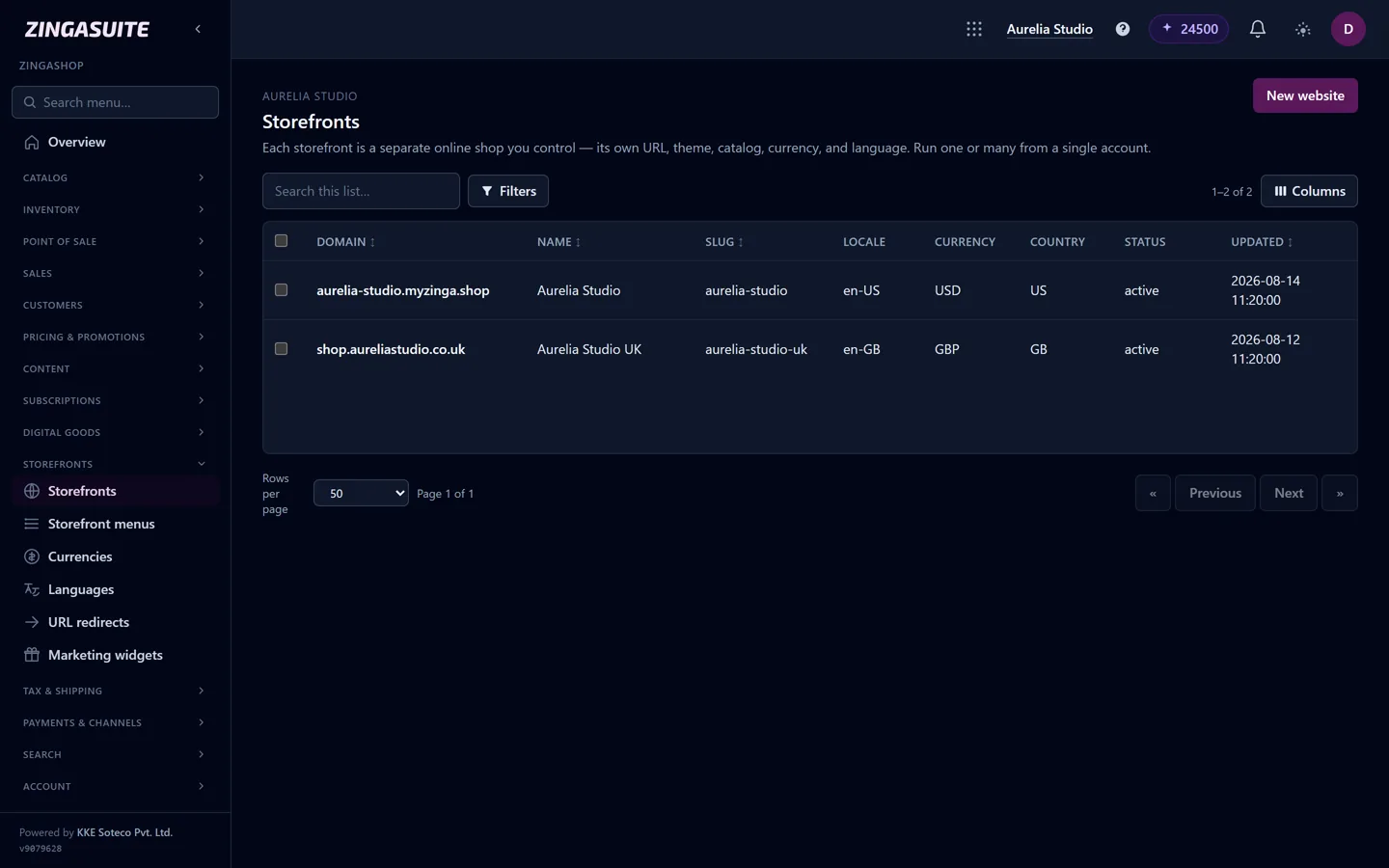
One catalog, two storefronts: a US store in dollars and a UK store in pounds, each with its own domain.
What a builder needs in 2026
Beyond the basics, we'd want a short, phone-first checkout with guest checkout and saved addresses; abandoned-checkout reminders by email and, where your customers use it, WhatsApp; help drafting product descriptions from a few facts, which you then edit; reviews collected after delivery; promotions beyond a coupon box, such as bundles and free-gift thresholds; and several currencies and languages if you sell abroad.
The SEO basics your builder has to let you do
A store nobody can find in search depends on ads forever. Make sure you can edit the title, description and URL of every product and category; that the builder generates a sitemap and canonical tags, so variants and filters don't create duplicate pages; that it outputs product structured data (price, availability, reviews), which is what powers rich results in Google; and, as our own July taught us, that it can redirect old URLs when anything moves.
What a first year really costs
Price the year, not the month. Add twelve months of the plan you'll need by month six, platform fees at your expected order volume, card and UPI processing (charged by your provider on any platform), the apps you'll add, a theme if you need one, and a domain at roughly $10 to $20 a year. Then add your own time, which with self-hosted software is the biggest cost of the lot. Write the two cheapest options side by side: the cheaper plan is often not the cheaper year.
Mistakes we'd avoid
Choosing on themes alone: a lovely theme on the wrong platform costs more than a plain one on the right platform. Ignoring per-sale fees because they look small at launch. Installing ten apps in the first week instead of the two you need to take an order. Launching with your whole catalog, when twenty well-photographed products will outsell two hundred thin listings. And leaving shipping costs and returns vague, which loses more checkouts than price does.
A 30-minute test before you commit
Pick your top two builders and give each half an hour. Sign up, add three real products with their variants, connect your actual payment gateway in test mode and place an order on your phone. Then price a realistic month, and export your products to CSV to make sure you can leave.
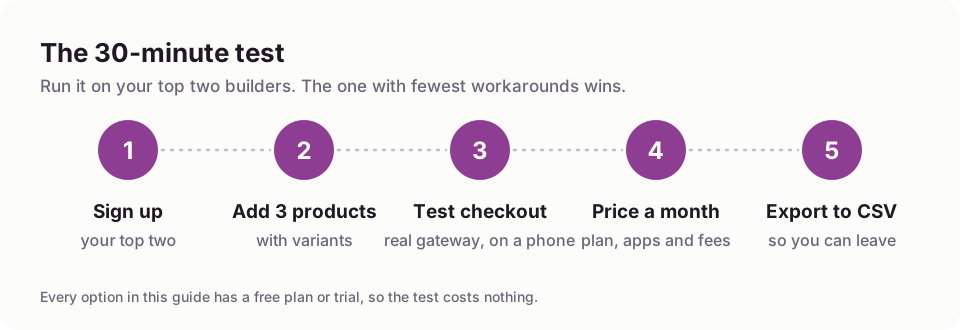
Run the same five steps on each builder you shortlist.
The builder that gets through those five steps with the fewest workarounds is your answer. For the launch itself, see how to start an online store, and for the money side, choosing a platform for a small business.
FAQ
Common questions
What is the best ecommerce website builder for beginners?
Which ecommerce builder has the lowest fees?
Can I use my own payment gateway?
Which is the best ecommerce website builder in India?
Is WooCommerce really free?
Do I need a developer to build an ecommerce website?
Can I move my store later?
See how fast a store can go live
Start free on ZingaShop. The setup wizard has a live store with a starter catalog running in a couple of minutes.