Lots of people search for a "ChatGPT website builder", expecting to describe a shop and get a working website back. That isn't quite what ChatGPT is. It doesn't host websites, take payments or keep a store running. What it does, very well, is write: the words on every page, the plan, mock-ups you can click through, product images, and with Codex, OpenAI's coding agent, the code for the whole store.
This guide shows you how to use each of those properly, in the order that saves the most rework. Halfway through, we'll look at what the store needs once it's live, because that's the part most guides skip, and at the shorter route we'd take ourselves. We make ZingaShop, so bear that in mind when you get there.
What ChatGPT does, and what it doesn't
- It does: product descriptions, policies and FAQs; a plan for the site; clickable page mock-ups in Canvas; banners and lifestyle images; and, through Codex, the full code for a store, written as a series of tasks you review.
- It doesn't: put the site on the internet, hold your products and orders in a database, process payments, send order emails or fix things when they break at night. For those you need a host, a database, a payment gateway, an email service and, eventually, someone on call.
You'll need a paid ChatGPT plan for Codex. ChatGPT Plus is $20 a month in the US and includes Codex within usage limits; heavier use needs Pro. Check OpenAI's plan page, because the limits change.
Step 1: Write the words first
Most store builds start with the design and leave the words until last, which is backwards. The words decide how many pages you need and what goes on them. Start a project in ChatGPT, upload a spreadsheet of your products, and ask for:
- A description for each product that answers what a buyer actually asks: size, material, what's in the box, how to use it, how to look after it.
- Shipping, returns, privacy and terms pages, written for the countries you sell to. Read them carefully: they're a starting point, not legal advice.
- An FAQ built from the questions your customers already ask you by email or WhatsApp. Paste them in.
- A title and a short description for each page, in the words people use when they search.
Give it your voice. Paste two or three things you've written yourself and ask it to match them. Generic AI copy is easy to spot, and it gives shoppers, and search engines, no reason to pick you.
Step 2: Sketch the pages in Canvas
Ask ChatGPT to open Canvas and build a mock-up of your home page, one product page and the cart as a single HTML page. Canvas can show it running, so you can click through and say what to change: bigger photos, the price nearer the button, delivery dates above the fold. A few rounds of this settle the layout before any real code exists.
Keep the mock-up as your reference. It has no database, no checkout and no address on the internet; its job is to make the decisions cheap.
Step 3: Choose how much store you need
Ask ChatGPT to recommend a setup, but give it your numbers, because the answer changes completely with them:
I sell 30 kinds of loose-leaf tea in Australia and New Zealand, each in 50 g, 100 g and 250 g bags. About 200 orders a month now, hoping for 1,000. Prices include GST. I want card and PayPal payments, Australia Post shipping rates, customer accounts and a simple admin. I'm not a developer. Compare three ways to build this, with what each costs a month to run and what I'd have to look after myself.
For a handful of products, a fast one-page site with hosted payment links is often enough, and ChatGPT can write it in an afternoon. For variants, stock, accounts and tax, you're building a real application, which is the rest of this guide.
Step 4: Build it with Codex, one task at a time
Connect Codex to a new GitHub repository and give it the plan. Then work in tasks, not one giant request. Each task runs in its own sandbox and comes back as a set of changes you can read before accepting:
- Set up the project, the database and the product catalog, including variants and stock.
- Build the home, category and product pages from your Canvas mock-up.
- Add the cart and checkout, with your payment gateway in test mode.
- Add customer accounts and order confirmation emails.
- Build an admin for products, stock and orders, behind a proper login.
- Add page titles, a sitemap and product structured data for search engines.
Read each set of changes before you merge it, and ask Codex to explain anything you don't follow. When a task breaks something that worked before, which will happen, you can see exactly what changed and undo it. If you prefer working on your own computer, the Codex command-line tool does the same jobs in a folder on your machine.
Step 5: Make images, honestly
ChatGPT's image generation is good for banners, category headers and lifestyle backgrounds. It shouldn't invent your product. Photograph the real thing, on a plain background in good light, and use AI for the scene around it, not for the product itself. A mug that looks different on arrival from the one in the picture comes back, with a review attached.
Ask for every image in the sizes your pages need, and make sure the site serves smaller files to phones. Most visitors will be on one.

Photograph the real product. Let AI make the scene around it.
Step 6: Payments, tax and emails
- Calculate every total on the server, from your own prices.
- Mark an order paid only when the gateway's webhook confirms it, and handle the same webhook arriving twice.
- Show tax the way your customers expect: prices including GST or VAT in Australia, the UK and Europe, sales tax added at checkout in the US.
- Set up your domain's email records (SPF, DKIM and DMARC) so order confirmations reach the inbox.
- Before launch, buy something yourself on a phone, with each payment method you offer, then refund it.
When all of that works, deploy, point your domain at the host, and submit your sitemap to Google Search Console. You've built a store with ChatGPT, and you understand how it works, which is worth a great deal.
Halfway: the one thing ChatGPT can't do for you
ChatGPT can't be there. It can explain an error message beautifully once you paste it in, but someone has to notice the error first, at whatever hour it happens, and that someone is now you. From launch day you're running a database, a cache, an email sender, a payment integration and a server, and every one of them needs attention whether or not you made a sale that week.
Here's what that costs, and the route we'd take instead: let ZingaShop run the store, and let an AI assistant do the day-to-day work in it.
What the store costs to keep running
For a store taking 300 orders a month, the bills for a lean self-built setup come to about $66 a month: ChatGPT Plus at $20, hosting at $20, a managed database at $25 and a domain. Run it properly, with backups you can restore to the minute ($100 a month on Supabase), error alerts ($26 on Sentry's Team plan) and a cache ($10), and it's about $200. Then there's your time. We've assumed six hours a month at $40 an hour, which is modest: one bad incident can take a weekend.
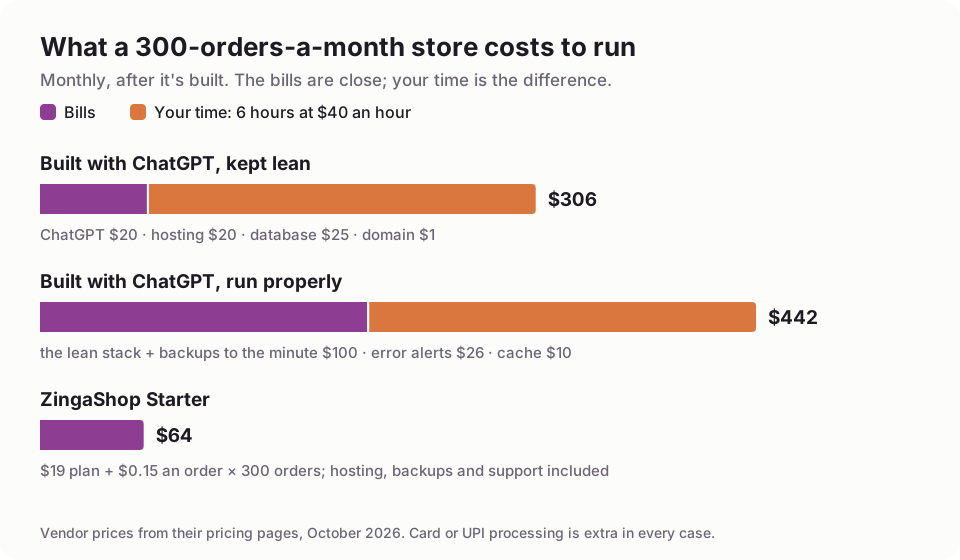
Six hours a month of your time is an assumption; change it to yours.
ZingaShop Starter for the same store is about $64 a month: $19 for the plan plus $0.15 an order, with hosting, backups and support included and credits each month that usually bring the order fees down. To be fair, at several thousand orders a month the order fees add up and a self-built store's bills can come out lower; by then, the hours and the cost of being down during a sale usually matter more.
What actually goes wrong
The failures that cost us most, running ZingaShop and our own store, kkeautocare.in, weren't bugs a better prompt would have prevented:
- We lost Google for seven weeks. When we moved zingasuite.com onto new software in July, we didn't carry the old page addresses across. Search impressions fell from about sixty a day to three before anyone noticed. A store that changes its URLs without redirects does the same thing to its product pages.
- The price was right, until you picked a size. Indian shoppers expect the M.R.P. struck through beside your price, and it has to change when they choose a different pack size. On some of our product pages it didn't, until we fixed it in October.
- Google became our customers. Google Merchant Center tests product listings by walking through checkout with made-up details; 8 of our first 30 customer records were Google's crawler. It looks like an attack, and blocking it can get your product feed rejected.
- Order emails went to spam. To a customer, an order confirmation that never arrives looks like an order that never happened.

Most of what breaks is outside the code. Someone has to know where to look.
Each needed someone who knew where to look. That's why ZingaSuite has a dedicated support team: the gateway that changed its rules, the DNS record that went missing and the emails that stopped arriving are theirs to chase, not yours.
The easier way: ZingaShop, with an assistant doing the work
ZingaShop gives you the storefront, checkout, hosting, database and caching, built and looked after. You connect your own payment gateway, so the money goes straight to your account, and we never take a percentage of your sales. Start free: the setup wizard has a live store, with a starter catalog for your kind of business, on a free myzinga.shop address in a couple of minutes.
Keep ChatGPT for what it did best in the first half of this guide: your product descriptions, policies, FAQs and images. Paste them into ZingaShop, or hand them to an assistant to do it for you.

Through the connector, an assistant works in your store with the permissions you approved.
For running the store by conversation, adding products, changing prices, checking stock, making coupons and pulling reports, ZingaShop has a connector built on MCP, the open standard AI assistants use to work with other software. Its address is https://mcp.zingasuite.com/mcp, and you sign in with your ZingaSuite account and choose read-only or read-and-change access. We built and documented it for Claude first: Claude's free plan allows one custom connector, which is all it needs, and our Claude guide walks through it.
ChatGPT also supports custom MCP connectors, on the plans where OpenAI enables them. Which plans, and whether a connector there may make changes or only read, has changed several times this year, so check OpenAI's current help pages before you count on it. Claude is the route we recommend for running ZingaShop by chat today.
When building it with ChatGPT is the right call
- You want to understand how an online store works, from the database up. Building one with Codex and asking ChatGPT to explain each change is a good way to learn.
- What you sell doesn't fit a platform: a product configurator, rentals, a marketplace.
- You, or a developer you work with, have time set aside every month to look after it.
Otherwise, use ChatGPT for the words and pictures, and let a platform carry the rest. Still comparing platforms? Our guide to ecommerce website builders compares the main ones, and AI store builders compared covers the platforms that generate a store for you.
FAQ
Common questions
Can ChatGPT build an ecommerce website?
Is there a ChatGPT website builder?
Do I need a paid ChatGPT plan to build a store?
Can ChatGPT host my website?
How much does a store built with ChatGPT cost to run?
Can I manage a ZingaShop store from ChatGPT?
Keep ChatGPT for the words. Let us run the store.
Start free on ZingaShop and have a live store in minutes, with hosting, checkout and support included.