
Claude can write most of an online store for you. Give it a clear brief and it will plan the pages, write the code, design the database, wire in a payment gateway and explain every step as it goes. People with no coding background are launching stores this way, and developers are building in a weekend what used to take a month.
This guide walks you through doing it properly. Halfway through, we'll stop and look at what happens after launch, because that's where most of the cost lives, and show you the route we'd take instead. We make ZingaShop, so we're biased about the ending. We've also been building and running software since 1999, and the second half of this guide is mostly things we learned by having them go wrong.
What you'll need
- A Claude plan with Claude Code. The free plan is fine for planning, but Claude Code, which writes and runs code on your own computer, needs Pro ($20 a month, or $17 billed yearly) or Max.
- A computer set up for code: Node.js, Git and a free GitHub account. Claude Code can walk you through installing them.
- Somewhere to host it: Vercel, Netlify, Render or a small cloud server.
- A database: managed Postgres from Supabase, Neon or your cloud provider.
- A payment gateway account: Stripe or PayPal in most countries, Razorpay or PayU in India. Apply early, because approval can take days.
- A domain and an email sending service, so order confirmations come from your own name.
- A weekend for the first version, and an honest estimate of the hours you'll spend on it every month afterwards. We'll come back to that.
Step 1: Write the brief before the first prompt
What Claude builds is only as good as your description of the store. Before you open a chat, write down:
- What you sell, roughly how many products, and how they vary: sizes, colours, pack sizes.
- Where your customers are, which currency they pay in, and whether your prices include tax.
- How they pay: cards, PayPal, UPI, cash on delivery, local wallets.
- How you ship: zones, flat rates, a free-shipping threshold, local pickup.
- What you need on day one and what can wait: reviews, coupons, customer accounts, a blog.
- Two or three stores whose look you like.
Then hand it over in one go. A prompt like this gets a far better first answer than "build me an online store":
I sell handmade leather bags in the UK and EU, about 40 products, each in two to four colours. Prices include VAT. Customers pay by card or PayPal. UK shipping is £4.95, free over £75; the EU is a flat £12. I need product and category pages, a cart, checkout, order emails and a simple admin to add products and see orders. Propose a tech stack and a build plan in stages before writing any code.
Step 2: Prototype in the Claude app first
Before you install anything, ask Claude in an ordinary chat to build a clickable prototype of the home page, one product page and the cart. It appears right in the conversation, so you can click through, say what feels wrong and get a new version in seconds. Changing your mind costs nothing now and a great deal later.
Treat it as a sketch. A prototype in a chat has no database, no payments and no address on the internet. Its job is to settle the layout and the flow.
Step 3: Build the real project with Claude Code
Create an empty folder, start Claude Code in it, paste your brief and ask for the plan first. Read it, ask about anything you don't understand, then let it build in small stages, checking each one in your browser before the next:
- The catalog: products, variants, categories and images.
- Product and category pages, with search.
- A cart that remembers each visitor.
- Checkout, with your gateway in test mode.
- Order confirmation emails.
- A password-protected admin for products, stock and orders.
- What search engines need: editable titles and descriptions, a sitemap and product structured data.
Ask Claude to commit to Git after every stage. When something breaks, and something will, you can see exactly what changed and go back.
Step 4: Get the database right
Most of the problems that surface months later start here. Ask Claude to design the tables (products, variants, prices, stock, customers, orders, order lines and payments) and to explain them to you. Then check a few things it won't always do unless you ask:
- Money is stored as whole cents or paise, never as decimals that round.
- Every change to the database goes through a migration file, so it can be repeated exactly on the live database.
- Stock comes off when payment succeeds, not when someone adds an item to the cart.
- Order numbers can't collide when two people check out in the same second.
- An order keeps the price and product name it was sold with, even after you edit the product.
Step 5: Wire in payments carefully
- Work out the total on the server. Never trust a price sent by the browser.
- Mark an order paid only when your gateway's webhook confirms it, and check the webhook's signature.
- Expect the same webhook to arrive twice, and make sure the second one changes nothing.
- Test every payment method on a real phone with the real apps. A card payment on a laptop proves very little about UPI on an Android phone.
Step 6: Deploy and launch
- Push the code to GitHub and connect the repository to your host.
- Put secret keys in the host's environment settings, never in the code.
- Point your domain at the host and check that HTTPS works.
- Add the SPF and DKIM records your email service gives you, or order confirmations will land in spam.
- Publish shipping, returns, privacy and terms pages. Gateways and ad platforms ask for them.
- Place a real order with a real card, refund it, and read every email that went out.
Congratulations: you have a store. Claude did most of the typing, and you understand how the pieces fit together, which is worth a lot.
Halfway: what you've actually signed up for
Here's what most tutorials leave out. Building the store was the short part. From launch day you're also running a database, a cache, an email sender, a payment integration and a server, and each of them needs looking after every week, whether or not you sell anything.
Claude will help you fix things when they break, and it's good at it. But it can only fix what someone notices, and it isn't on call at 2 a.m. when checkout stops working in the middle of a sale. So this is where we'd take a different route: let ZingaShop run the store, and let Claude run ZingaShop. You keep the part you enjoyed, describing what you want in plain English, and hand over the part that wakes you up at night. First, here's what that part involves, so you can judge for yourself.

The storefront is the part you see. Everything under it needs looking after too.
Running the database: the costs that don't show on day one
A managed database starts cheap. Supabase's Pro plan, for example, is $25 a month and includes a small database server and seven days of daily backups. The costs that arrive later are the ones that matter:
- Backups you can actually use. With only a daily backup, a bad import at 4 p.m. can cost you a day of orders. Restoring to the minute is usually an add-on; on Supabase it's $100 a month for seven days of history. And a backup you've never restored is a hope, not a backup.
- Schema changes on live data. Every feature that needs a new column means a migration on the database your customers are using right now. Release the code before the migration and every page that reads that column fails until someone notices.
- Connections. Serverless hosting opens database connections freely, and a small database allows only so many. A spike from an ad can use them all up and take the store offline while the server itself is fine. You'll need a connection pooler, and to understand it.
- Growth. Queries that were instant with 50 products crawl at 5,000 without the right indexes, and you usually hear about it from a customer.
On ZingaShop, all of that is ours: the database's size, its schema changes, its indexes and keeping it backed up.
Caching: why it matters, and where it gets hard
If every visit to a product page asks the database to build it from scratch, the store is slow on a good day and falls over on a busy one, such as the hour after someone with a big following mentions you. Caching means keeping ready-made copies of pages close to shoppers, so the database is rarely asked at all. It's the biggest single reason one store feels instant and another doesn't.
The bills for it are modest: a CDN is often free or about $20 a month, and a Redis cache costs $0 to $20 at small-store scale. The expensive part is getting it right. Over the years we've settled on three layers for every ZingaShop storefront:
- An edge cache near the shopper, so most visits are answered from a data centre in their own region. Our target is under 30 milliseconds.
- A page cache on our servers, holding freshly built pages in memory for when the edge doesn't have a copy. Under 15 milliseconds.
- One database query per page. When a page does have to be built, everything on it comes back in a single query, not dozens. Under 80 milliseconds, even from cold.
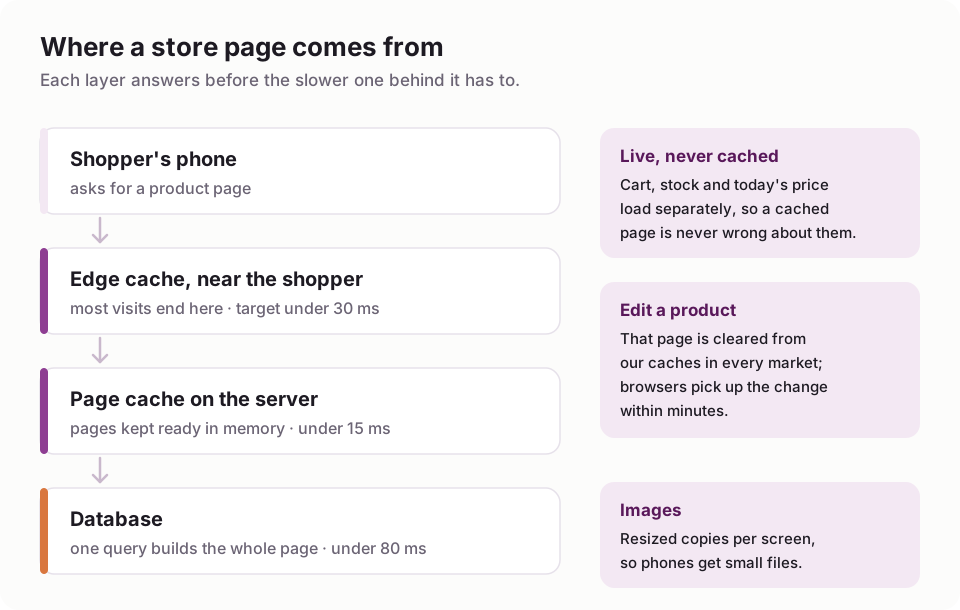
The three cache layers behind every ZingaShop storefront.
Then comes the genuinely hard part: knowing when a copy is wrong. Change a price and every cached copy of that page, in every market and currency, has to go at once, or someone pays yesterday's price. So carts, stock and live prices load separately and never come from a cache, and images and scripts get a new address whenever they change, which lets browsers keep them for a year without ever showing a stale one.
We learned one of those rules the hard way. A setting in our CDN's dashboard, not in our code, told shoppers' browsers to keep storefront pages for a year instead of the five minutes our code asked for. Returning visitors could see an old copy of a page, old price included, long after we'd changed it. No code review would have caught it, because the bug wasn't in the code.
Things break, and usually not in the code
That CDN setting is typical. Most of what has gone wrong for us in production had nothing to do with a bug a better prompt could have prevented. A few from our own store, kkeautocare.in, and the platform under it:
- Google created our customers. Google Merchant Center checks product listings by walking through the real checkout with made-up details. On our store, 8 of the first 30 customer records were Google's crawler, which looked exactly like a hacked sign-up form. Blocking it risks the product feed being rejected, so we now recognise those visits and set them aside.
- Payments behaved differently on phones. UPI payments made in a phone's payment app needed a different confirmation path from the same payment made on a desktop. Every laptop test had passed.
- A routine update starved the server. An ordinary software deploy used up the server's memory, and for a while pages took twelve seconds to start loading. The fix was a bigger machine, not a code change.
- One error hid behind another. When something failed behind our CDN, everyone saw the same generic "error code: 502". The real cause, an outside provider's rate limit, showed up only in the server's own logs.
Claude can help with every one of these once someone knows where to look. Knowing where to look is the job. At ZingaSuite we have a dedicated support team for exactly this: the gateway that changed its rules, the DNS record that went missing, the confirmation emails that started landing in spam. That way you don't have to become the person who knows.
The easier way: ZingaShop, run from Claude
ZingaShop is the online store in ZingaSuite. The storefront, checkout, hosting, database and caching are ours to run. You connect your own payment gateway, so payments land straight in your account, and we never take a percentage of your sales.
What makes it easy with Claude is the ZingaShop connector. It uses MCP, the open standard Claude uses to work with other software, so once it's connected Claude can do the work in your store that you'd otherwise click through yourself. Setting it up takes about five minutes:
- Create your store. Start free on ZingaShop. The setup wizard has a live store with a starter catalog on a free myzinga.shop address in a couple of minutes.
- Add the connector in Claude. Open Customize, then Connectors, choose to add a custom connector, name it ZingaShop and paste https://mcp.zingasuite.com/mcp. If Claude asks how it should identify itself, choose automatic registration.
- Sign in and approve. Claude opens a ZingaSuite sign-in page. Pick your store, and choose whether Claude may only read or may also make changes.
- Switch it on in a chat from the + menu, under Connectors, and ask for what you want.
Custom connectors work on every Claude plan, and the free plan allows one, which is all this needs. If you use Claude Code or Claude Desktop, our docs cover those too.

Once the connector is on, Claude works in your store through the same permissions as the console.
Then talk to your store:
Create categories for Bags, Wallets and Belts. Then add the 12 products in this table, with each colour as a variant, at these prices.
Set the Classic Tote to £85, or £75 each when someone buys two or more.
Which products are running low? Suggest restock quantities based on last month's orders.
Make a coupon called WELCOME10 for 10% off, valid until the end of the month.
How many orders did we take this week, and how much revenue?
If you already sell on Shopify or WooCommerce, you can also ask Claude to bring your products, customers and order history across.
Who does what
- Claude does the work you'd otherwise click through: products, prices, categories, stock, coupons, pages and reports, in plain English.
- ZingaShop runs everything underneath: the storefront, checkout, database, caching and security updates, plus sales channels to Google, Meta and Amazon on the plans that include them.
- Our support team deals with what breaks outside the code.
- You decide what to sell, and keep the money.
You stay in control throughout. Claude can do only what the access you approved allows, and you can revoke that access from the ZingaSuite console at any time.
What each route costs to run
Here is the same store, taking 300 orders a month, run three ways. For the self-built routes we've used list prices: Claude Pro at $20, Vercel Pro hosting at $20, Supabase Pro at $25 and a domain at about $1 a month; for a store run properly, add point-in-time recovery at $100, Sentry error alerts at $26 and an Upstash Redis cache at $10. We've assumed six hours a month of your time at $40 an hour to keep it all running. That's modest: one bad incident can take a weekend.
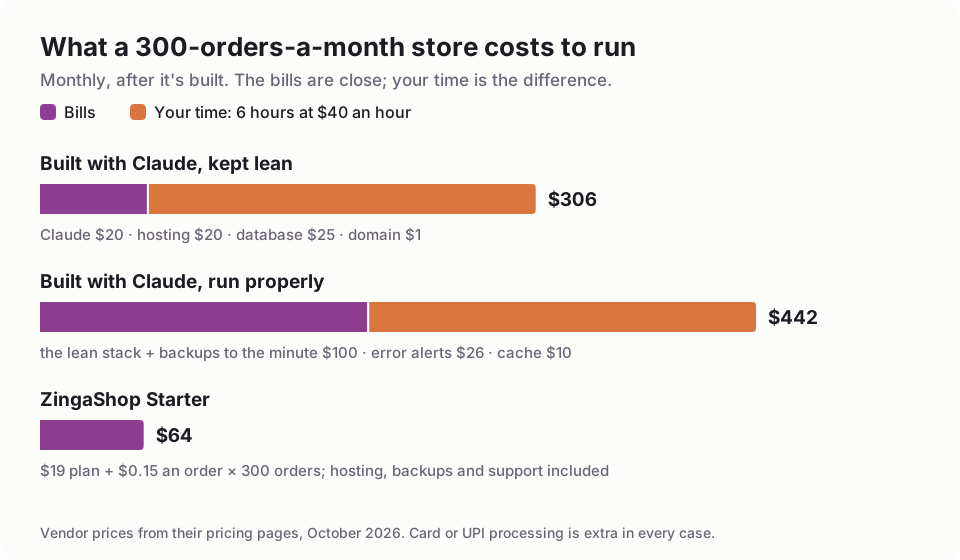
Six hours a month of your time is an assumption; change it to yours.
The bills alone are close: about $66 a month for the lean version against $64 for ZingaShop Starter ($19 plus $0.15 an order). Run the self-built store properly and the bills reach about $200. The real difference is the time, and who gets the call when something breaks. On ZingaShop, that's us. Your plan also includes credits each month, so the order fees usually come out lower than shown.
To be fair about it: at several thousand orders a month the order fees add up, and a self-built store's bills can come out lower. By then, though, the hours, and the cost of being down during a sale, usually matter more. ZingaShop also has a free plan with up to 50 products and 50 orders a month, and the fee per order drops as you grow, from $0.20 on Free to $0.05 on Scale. ZingaShop pricing has every plan.
When building it yourself with Claude is the right call
- You want to learn how an online store works from the inside. There's no better teacher than building one with Claude explaining every line.
- What you sell doesn't fit any platform: a product configurator, an unusual marketplace, bookings that also sell products.
- You're a developer, or have one, with time set aside every month to look after it.
If that's you, the first half of this guide is a sound start and the second half is your list of things to plan for. For everyone else, ZingaShop with Claude gets you the store and keeps the part you'd actually enjoy. Still comparing platforms? Our honest guide to ecommerce website builders covers the others, and how to start an online store covers everything around the website.
FAQ
Common questions
Can Claude build an ecommerce website?
Do I need to know how to code to build a store with Claude?
How much does it cost to build an ecommerce website with Claude?
Does Claude host my website?
Can I manage a ZingaShop store from Claude's free plan?
Is it safe to let Claude change my store?
Get the store without the 2 a.m. calls
Start free on ZingaShop, then connect Claude and set up your catalog in plain English.