
Grok makes a capable partner for building an online store. It can search X and the web while you work, which makes it useful for the research before the build as well as the code itself. And with Grok Build, xAI's coding agent, it can write and run a whole project on your computer.
This guide takes you through it properly, from the first research prompt to a store taking real payments. Halfway through, we'll look honestly at what the store needs once it's live, and at the shorter route we'd take ourselves. So you know where we stand: we make ZingaShop, and we've been building software since 1999, so we have opinions about the second half.
What you'll need
- A Grok plan. Free Grok can plan with you and write code in chat. Grok Build, the agent that works inside your project, comes with paid plans such as SuperGrok (about $30 a month in the US) and X Premium+. Plans change often, so check xAI's site.
- A computer with Git and Node.js (or Python, if that's what Grok proposes), and a free GitHub account.
- Accounts for hosting, a database and email: Vercel or Render, Supabase or Neon, Resend or Amazon SES.
- A payment gateway that works where your customers are: Stripe and PayPal in most countries, Razorpay or PayU in India.
- A domain, at around $10 to $20 a year.
Step 1: Use Grok for research before any code
Grok's live search of X and the web is the most useful thing it brings to a new store, and it's wasted if you jump straight to code. Before you build anything, ask it to:
- Summarise what people on X are complaining about in your product category this month. Complaints make a good product brief.
- List five competitors with their prices, shipping costs and return policies.
- Find the words people actually use when they talk about and search for your product, so your page titles match them.
- Suggest names for the store. Then check the domain and social handles are free before you fall for one.
Step 2: Decide how much store you need
Not every shop needs a custom-built website. Pick the smallest route that works:
- One to five products: ask Grok for a single fast page that links each product to a hosted payment link from Stripe, PayPal or Razorpay. There's no database or checkout to build, and you can be live this afternoon.
- A real catalog, with variants, stock and customer accounts: build a full store with Grok Build. That's the rest of this guide.
- A real catalog without the upkeep: a hosted platform. We'll come to that.
Step 3: Get a plan before you get code
Ask Grok for a written plan first, and give it everything it needs to know:
Plan an online store for my coffee roastery, selling in Canada and the US. About 25 products, each sold as 250 g, 500 g or 1 kg bags, whole bean or ground. Prices in CAD and USD. Card payments through Stripe, flat-rate shipping by country, free over $60. I need product pages, a cart, checkout, customer accounts, order emails and a small admin. Recommend a stack I can host cheaply, list the database tables, and split the build into stages I can test one at a time. No code yet.
Read the plan properly. Ask what each piece is for, and push back on anything that adds a monthly bill you don't understand. A common answer is a web framework such as Next.js, a Postgres database, Stripe for payments and an inexpensive host, which is a sensible default.
Step 4: Build in slices with Grok Build
Start Grok Build in an empty project folder, give it the plan and work through it one slice at a time, testing each in the browser before moving on:
- The database and catalog: products, variants, prices in each currency, and stock.
- Home, category and product pages that load quickly on a phone.
- A cart that survives a closed tab.
- Checkout with Stripe in test mode, showing tax the way your market expects.
- Customer accounts and order emails.
- An admin for products, stock and orders, behind a proper login.
Commit to Git after every slice. When Grok fixes one thing and breaks another, which every coding assistant does now and then, you can see what changed and roll it back.
Step 5: Make payments and orders trustworthy
- Calculate every order total on the server, from your own prices.
- Treat an order as paid only when the gateway's webhook says so, after checking its signature.
- Handle the same webhook arriving twice without creating two orders.
- Take stock off when payment succeeds, and decide what happens when two people buy the last bag at the same moment.
- Show tax correctly: prices including VAT in the UK and EU, GST or HST by province in Canada, sales tax by state in the US.
Step 6: Build speed in from the start
A store that asks its database to build every page on every visit is slow, and it falls over on the day you finally get busy. Ask Grok to build caching in now, while the code is still small:
- Serve pages through a CDN, so most visitors get a copy from a data centre near them.
- Keep recently built pages in memory on the server, for when the CDN doesn't have one.
- Build each page with as few database queries as possible. One is the goal.
- Load the cart, stock and live prices separately from the page, so a cached page can never show the wrong ones.
- Clear every cached copy of a page as soon as its product changes.
- Give images and scripts a new name or version whenever they change, and serve resized images so phones download small files.
The fourth and fifth points are where caches go wrong. A page that's fast but shows yesterday's price is worse than a slow one.

A cache is a kiosk near the shopper, so most pages never have to come from the warehouse.
Step 7: Deploy and launch
- Deploy from GitHub to your host, with secret keys in its environment settings.
- Connect your domain and check HTTPS.
- Add the SPF, DKIM and DMARC records your email service gives you, so order emails reach the inbox.
- Write shipping, returns, privacy and terms pages.
- Switch the gateway to live mode, buy something yourself on a phone, refund it, and read every email you receive.
Halfway there: the store is built, and now it has to stay up
If you've followed along, you have a working store and you know how it's put together. That's a real achievement. It's also the moment the work changes: from now on you're running a database, a cache, an email sender, a payment integration and a server, every day, whether you feel like it or not.
This is where we'd do it differently. An online store is much easier to run on ZingaShop, with an AI assistant doing the day-to-day work, and today the easiest assistant to do that with is Claude. We'll show you how below, and how to keep Grok in the picture. First, the running costs, so you can weigh it up yourself.
The running costs nobody quotes you
The database
Managed Postgres is cheap to start: about $25 a month on Supabase's Pro plan, with seven days of daily backups. What you add over time decides whether a bad day is an inconvenience or a disaster:
- Restoring to the minute instead of to last night: $100 a month on Supabase for seven days of history.
- A bigger database server once the catalog and traffic grow: $15 to $60 a month more.
- Someone to run every schema change against the live database in the right order, and to practise restoring a backup before the day it's needed.
Caching
The tools are inexpensive: a CDN costs nothing to $25 a month and a Redis cache $0 to $20. What costs is the attention. Every new feature has to follow the caching rules, or it ships a page that's fast and wrong. Over the years we've arrived at three layers for ZingaShop stores: an edge cache near the shopper, a page cache in memory, and one database query per page, with targets of under 30, 15 and 80 milliseconds. Carts and live prices are kept out of the cache altogether.
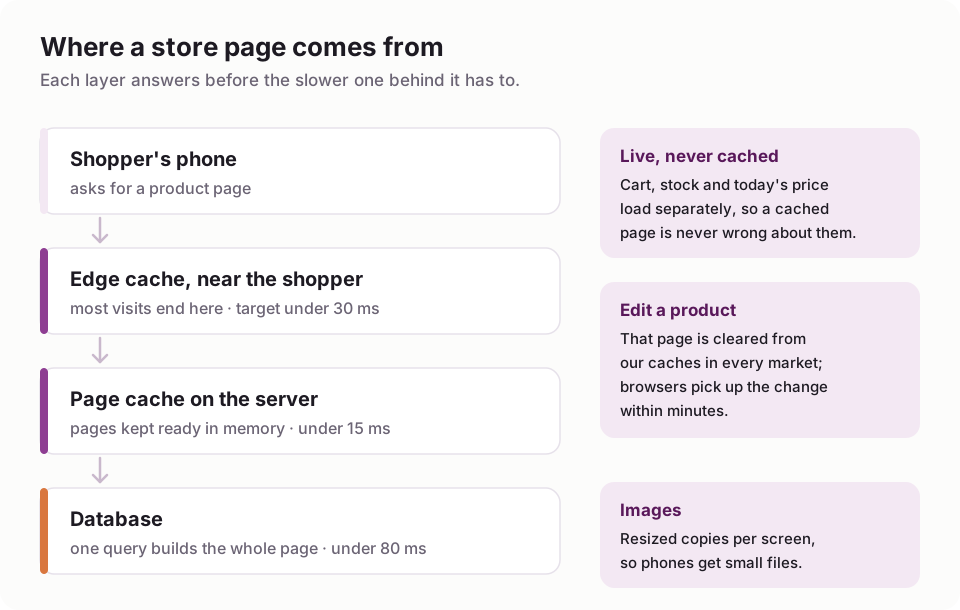
The three cache layers behind every ZingaShop storefront.
Everything around it
Error alerts, so you hear about failures before customers tell you (Sentry's Team plan is $26 a month). Bot protection for your sign-up and login forms. Email that reaches the inbox. And the AI subscription you keep paying to maintain the code: about $30 a month for SuperGrok.
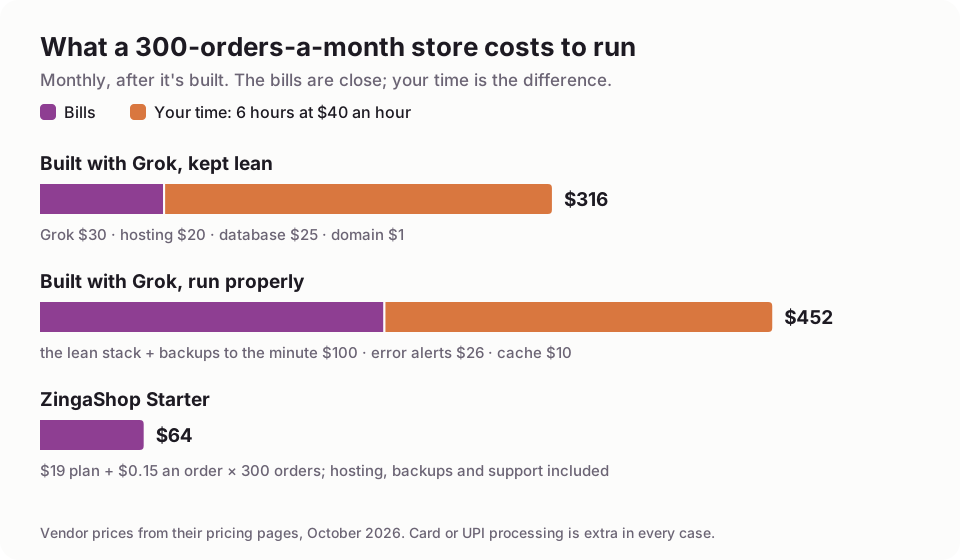
Six hours a month of your time is an assumption; change it to yours.
For a store taking 300 orders a month, the bills alone are close: about $76 a month for a lean self-built store against $64 for ZingaShop Starter ($19 plus $0.15 an order). Run it properly and the bills reach about $210. Add six hours a month of your time at $40 an hour, a modest guess when one bad incident can take a weekend, and ZingaShop costs a fraction of building it yourself. To be fair: at several thousand orders a month the order fees add up, and a self-built store's bills can come out lower. By then, the hours and the cost of being down during a sale usually matter more.
What breaks once real customers arrive
Here's the part no prompt gets you around: most production problems aren't bugs. A few we've met running ZingaShop and our own store:
- A cache told browsers to keep pages for a year. One setting in our CDN's dashboard overrode the five minutes our code asked for, so returning shoppers could see an old page, old price included. The code was right the whole time.
- Google's shopping crawler kept signing up. To check product listings, Google walks through checkout with made-up details. On our own store, 8 of the first 30 customers were Google. It looks like an attack. It isn't, and blocking it can get your product feed rejected.
- WhatsApp has a speed limit. Meta lets a business number send marketing messages at roughly 50 a minute, so a big broadcast takes hours, however fast your code is.
- A routine update starved the server. An ordinary deploy ran the server out of memory, and pages took twelve seconds to load until we moved to a bigger machine.
And the classic: order emails landing in spam because the domain's email records weren't set up, which to a customer looks like the order never happened.

Most of what breaks is outside the code. Someone has to know where to look.
Each of these needed someone who knew where to look. That's why ZingaSuite has a dedicated support team: their job is the gateway that changed its rules, the DNS record that went missing and the emails that stopped arriving, so it doesn't have to be yours.
The easier way: ZingaShop, with an AI assistant doing the work
ZingaShop gives you the store, checkout, hosting, database and caching, already built and looked after. You connect your own payment gateway, so payments go straight to your account, and we never take a percentage of your sales.
The day-to-day work, such as adding products, changing prices, checking stock, making coupons and pulling a sales report, you can hand to an AI assistant through the ZingaShop connector. We built and documented it for Claude first, and it's the smoothest way to run ZingaShop by conversation today:
- Create a free ZingaShop store. The wizard has it live on a myzinga.shop address in a couple of minutes.
- In Claude, open Customize, then Connectors, and add a custom connector with the address https://mcp.zingasuite.com/mcp.
- Sign in to ZingaSuite when asked, pick your store, and choose read-only or read-and-change access.
- Switch the connector on in a chat and ask in plain English: "add these 25 coffees, each in three bag sizes", "which products sold best last week?", "make a 15% coupon that ends on Sunday".
Claude's free plan allows one custom connector, so you can try this without paying for Claude. Our docs cover Claude Code and Claude Desktop as well.
Keep Grok for what it does best
You don't have to give up Grok. Keep it for what it's best at: watching what people say about your products on X, spotting trends early, and drafting posts and ads. Grok's custom connectors use the same open standard as ours, MCP, so you can also add the same address at grok.com/connectors. We've built and documented the experience around Claude, though, so that's where we'd start.
When building it with Grok is the right call
- You want to learn how stores work under the hood.
- You sell something no platform handles well: made-to-order configurations, rentals, a marketplace with other sellers.
- You have development time set aside every month, yours or someone else's, for upkeep.
Otherwise, let Grok do the research and the marketing, let ZingaShop run the store, and let Claude do the clicking. If you're still choosing a platform, our guide to ecommerce website builders compares the main ones, and how to start an online store covers everything around the website.
FAQ
Common questions
Can Grok build an ecommerce website?
Is Grok free for building a website?
What is Grok Build?
How long does it take to build an online store with Grok?
Can I manage a ZingaShop store with Grok?
How much does a self-built store cost to run?
Skip the upkeep, keep the AI
Start free on ZingaShop, then let an AI assistant manage your catalog in plain English.