An online assessment platform is software for building tests, sending them to people, keeping the attempt fair and turning the answers into a decision. Hiring teams use them to screen applicants, trainers to check what a course actually taught, and certification bodies to run exams they can stand behind. The software is the easy part. The hard part is choosing one that measures the right thing without driving candidates away.
We build one, Zingalify, so weigh what follows accordingly. We've also written sixty ready-made tests for it ourselves, for sales roles, finance, engineering, support, HR and general aptitude, and one for service technicians on car-wash, steam and wheel-wash systems, because the KKE group that makes ZingaSuite also makes that equipment. Writing tests people actually sit taught us more about what an assessment platform needs than any feature list.
Who uses an online assessment platform
Hiring teams screen applicants with skills and aptitude tests before interviews. Learning and development teams check that training actually landed, and keep records for compliance courses that regulators can ask to see. Schools, colleges and coaching centres run mock and final exams. Certification bodies and manufacturers certify the people who install, service or sell their products, which is exactly why our own library includes a test for car-wash service technicians. Each group needs the same core platform, set up very differently.
Start with the decision, not the software
Before you look at a single product, write one sentence: "After this test, we will decide…". Which applicants to interview? Who passed the compliance course? Who gets the certificate? That sentence decides almost everything else: how long the test should be, how much security it needs, whether a person has to review the results, and which privacy rules apply.
A practice quiz and a pre-employment test can look identical on screen. They are completely different products to run.
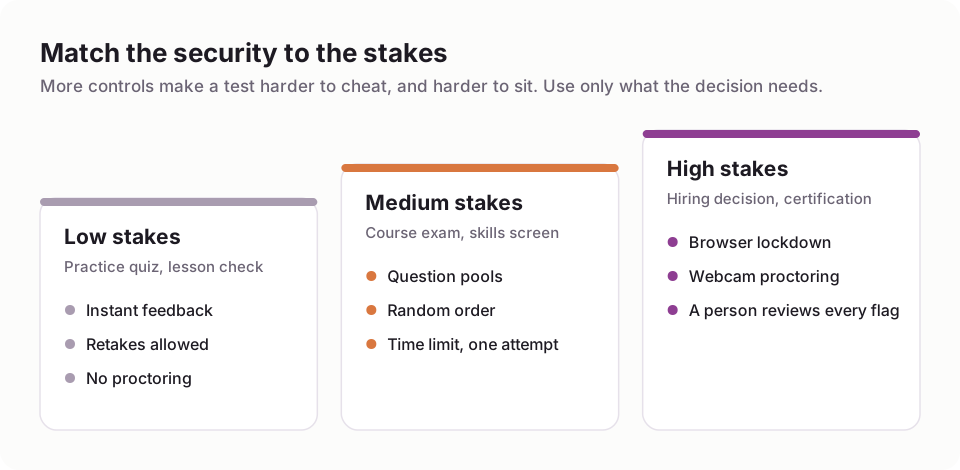
The decision you're making sets how much security the test needs.
What separates one online assessment platform from another
The kinds of test it can actually run
Knowledge and skills tests are table stakes. Check whether you also need cognitive or aptitude tests, situational judgement, personality and behavioural questionnaires, language tests or code. Then look at question types: multiple choice is easy for everyone, but written answers, ordering, matching, audio or video responses, and code or SQL questions are where platforms differ. The format should fit the skill. You can't test whether someone writes a clear customer email with a multiple-choice question.
Whether you can start without writing everything yourself
Writing a good test takes far longer than people expect. Each question needs a clear stem, plausible wrong answers and a review by someone who knows the job. A library of ready-made tests saves weeks, but only if its questions stay private: if a test's contents are visible to every customer, they end up on the internet and stop measuring anything. In Zingalify the standard-library tests are delivered as-is and their contents stay hidden from subscribers for exactly that reason.
The library also has to grow. Since launch we've expanded several of ours, the general aptitude test to 30 questions and quality assurance to 50, because a short test with a small question pool gets memorised quickly.
AI that drafts, and a person who decides
Most platforms now offer AI question generation. It's genuinely useful for a first draft and genuinely risky if it publishes straight to candidates. Look for a flow where AI drafts and a person approves. Ours generates an outline first, then the questions, and never publishes anything on its own.
Security that matches the stakes
Every control that makes a test harder to cheat also makes it harder to sit. For a lesson check, none is needed. For a skills screen, question pools, random order, a time limit and one attempt cover most of it. For hiring decisions and certification, add a lockdown that notices when the candidate leaves the test window, and proctoring: webcam snapshots checked for a second person, a phone or an empty seat, or a live human proctor for the highest stakes. Our guide to online proctoring software covers what it can and can't catch.

Each step up adds integrity, and friction for the candidate.
The candidate's experience
Your test is the first piece of work a candidate does for you. It should work on a phone, survive a dropped connection without losing answers, keep time on the server rather than in the browser (so a refresh can't add minutes), and tell people up front how long it takes. Zingalify runs every attempt through a dedicated take portal with a server-side timer, auto-save and offline buffering for exactly those reasons.
Scoring you can explain
Objective questions should mark themselves instantly; essays, recordings and code need a clear rubric and a reviewer. Look for score bands rather than a single number, a breakdown by section so you can see where someone is strong or weak, and certificates if you run courses. Optional AI interpretation reports can help with longer psychometric questionnaires, but treat them as a second opinion, never the decision.
Then look at the questions themselves after the first group sits the test. A question almost everyone gets right, or that strong candidates miss more than weak ones, is telling you to rewrite it.
How online assessment platforms charge
There are two main models. Subscriptions charge a monthly or annual fee, often per seat or per volume tier, whether you test fifty people that month or none. Pay-per-test pricing charges for each completed attempt, so a quiet month costs nothing.

Pay per test fills one coin at a time; a subscription bills the whole jar every month.
Assessment volume is lumpy: it spikes when you're hiring or when a cohort finishes a course, then goes quiet. That's why we chose pure pay-per-test for Zingalify. Building tests is free, with unlimited seats; each completed test costs $1 to $3 depending on the proctoring it uses, with proctoring and 24 months of data retention included; and there's no monthly fee. If you test hundreds of people every week, all year round, run the numbers both ways: a subscription can work out cheaper at steady high volume.
A worked example: a company hiring 40 people a year might test 400 applicants with a 25-minute screen. On per-test pricing that's 400 completed tests at $1 to $3, so $400 to $1,200 for the whole year, and nothing in the months it isn't hiring. Compare that with twelve months of whichever subscription tier would cover your busiest month.
Questions to ask every vendor
- What happens to a candidate's answers if their connection drops for two minutes?
- Is the timer kept on your server or in the browser?
- Can I see a real candidate's view on a phone, not a demo?
- Who can see the questions in your ready-made tests, and how often are they refreshed?
- Does AI-generated content ever reach candidates without a person approving it?
- How are proctoring flags reviewed, and can candidates respond to them?
- Where is candidate data stored, and how long do you keep it by default?
- What will I pay in a month when I test nobody?
The answers tell you more than any comparison table.
Candidate data and the law, by region
An assessment produces personal data, and in hiring it feeds a decision about someone's livelihood. The rules differ by where your candidates are.
- United States: under Title VII and the federal Uniform Guidelines on Employee Selection Procedures, a test used in hiring should be job-related and shouldn't screen out a protected group disproportionately without justification (the "four-fifths" rule of thumb). The ADA requires reasonable accommodations, such as extra time. New York City's Local Law 144 requires bias audits for automated tools that substantially assist hiring decisions, and Illinois' BIPA covers biometric identifiers such as face geometry.
- Canada: human-rights codes require accommodation, and PIPEDA (with Quebec's Law 25) governs candidate data.
- United Kingdom: the Equality Act 2010 requires reasonable adjustments, and the UK GDPR gives candidates rights over decisions made solely by automated means.
- European Union: GDPR applies to every result and webcam image, and the EU AI Act classes AI used in recruitment as high-risk, with obligations phasing in; check the current timetable before relying on AI scoring.
- India: the Digital Personal Data Protection Act requires clear notice and consent for collecting candidate data, and limits how long you keep it.
- Australia: anti-discrimination laws apply to selection, and the Privacy Act and its principles cover most organisations' candidate data.
The practical common ground: test only what the job needs, give the same test the same way to everyone applying for a role, offer adjustments, tell candidates what you collect and for how long, and keep a person in the loop for the final decision.

Bands, section breakdowns and certificates are what turn answers into a decision.
A shortlist test you can run in an afternoon
Pick two platforms. In each, build a short test with three question types you'll really use, send it to two colleagues (one on a laptop, one on a phone), have one of them switch off Wi-Fi halfway through, and then read the results screen as if you had to make a decision from it. Finally, price twelve months at your real volume, including the quiet months. The platform that comes out of that afternoon with the fewest surprises is usually the right one.
For the hiring side specifically, read our practical guide to pre-employment testing; for schools, coaching centres and certification, see choosing online exam software; and for writing the test itself, how to create an online test.
FAQ
Common questions
What is an online assessment platform?
How much does an online assessment platform cost?
Can I use ready-made tests?
Is AI-generated test content reliable?
Do I need proctoring?
Build an assessment free
Author tests with your whole team at no cost, and pay only when someone completes one.